On this page ▾
- The four main cash-out routes
- Route 1: Crypto to Interac (most popular)
- Route 2: Withdraw skins and sell them
- Why you should avoid Steam Wallet as a cash-out
- Identity checks and limits
- Reduce fees: practical tips
- Withdrawal problems and how to handle them
- Safety checklist
- Tax and record-keeping
- Plan your exit before you play
- Coins are not cash. You need to convert them to skins or crypto first, then to CA$.
- The most common Canadian route: withdraw crypto, sell it on a FINTRAC-registered exchange, then take an Interac e-Transfer to your bank.
- Selling skins on the Steam Market only returns Steam Wallet funds, which you cannot withdraw.
- Typical all-in cost of a crypto route is a few percent; skin routes can cost 5% to 15%.
- Complete identity verification early so your first withdrawal is not delayed.
Winning is only half of the job. Getting a balance back into Canadian dollars without losing a large chunk to fees is the other half. Because skin sites are mostly offshore, they rarely offer Interac or bank payouts, so Canadians use a few well-worn routes. Below we compare them, show a worked CA$ example and list the checks that prevent mistakes.
The four main cash-out routes
| Route | How it works | Approx. all-in cost | Speed |
|---|---|---|---|
| Crypto to exchange to Interac | Withdraw BTC/LTC/ETH/USDT, sell on a FINTRAC-registered exchange, e-Transfer to bank | 2% to 5% | Same day typical |
| Withdraw skins, sell on a third-party market | Take skins to Steam inventory, list on a skin marketplace for cash or crypto | 5% to 12% | Hours to days |
| Withdraw skins, sell on Steam Market | Sell for Steam Wallet funds | About 13% (Steam fee), and funds are locked | Fast |
| P2P marketplace on the site | List skins or buy skins from other players with coins | Site fee, often 5% to 10% | Depends on buyers |
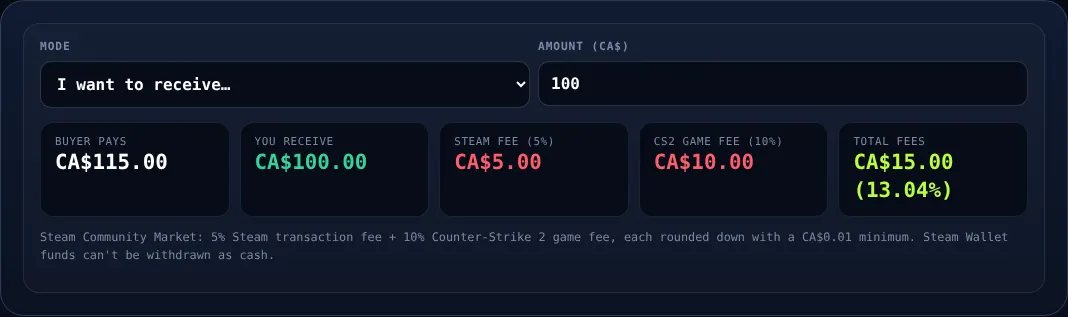
Steam fees: the Steam Market adds about 5% Steam fee and 10% game fee, so a CA$100 buyer price returns about CA$86.96 to the seller. Check yours with the Steam fee calculator.
Route 1: Crypto to Interac (most popular)
- Verify your account on the skin site and set up two-factor authentication.
- Choose the crypto and network. Litecoin or USDT on a low-fee network are common. Avoid networks with high fees if your balance is small.
- Copy your exchange deposit address. Triple-check the first and last characters and the network type. A wrong network can lose funds permanently.
- Withdraw a small test amount first, such as the equivalent of CA$20. Confirm it arrives.
- Withdraw the rest and wait for the required confirmations.
- Sell for CAD on the exchange. Use a limit order where possible, to avoid the wide spread on instant "convert" buttons.
- Withdraw by Interac e-Transfer to your RBC, TD, Scotiabank, BMO, CIBC or other bank account.
Tip: Choose an exchange registered with FINTRAC as a money services business. It means it must follow Canadian identity-verification and record-keeping rules, which also makes tax reporting easier.
Worked example
You hold a balance worth about CA$500 on a skin site. The site charges a small crypto withdrawal fee of around CA$2 on Litecoin. The exchange sells LTC at a spread of about 0.5% (roughly CA$2.50) and a trading fee of 0.2% (about CA$1). Interac e-Transfer withdrawal is often free or around CA$1 to CA$5. Total costs are roughly CA$8 to CA$10, or 2% of the balance. A skin route selling at 90% of market value would cost around CA$50 on the same amount. Run your own numbers in our coins to CAD converter.
Route 2: Withdraw skins and sell them
If you want to keep skins you like, or if the site offers a better skin rate than crypto, you can withdraw items to your Steam inventory. The site's bot sends a trade offer; accept it in the Steam Mobile Authenticator. Then you can keep the item, trade it, or list it on a third-party marketplace that pays out to cash, crypto or PayPal depending on the service.
Be careful about two things:
- Trade protection. Valve's trade protection system means items you receive may be reversible for around 7 days. We explain it cautiously in Steam trade protection explained. Do not assume you can instantly re-sell every item.
- Price differences. A site may value a skin more than you can realise on a market. Always check the likely sell price before deciding.
For more on selling, read Cashing out skins to CAD.

Why you should avoid Steam Wallet as a cash-out
Selling a skin on the Steam Market gives you Steam Wallet funds. You cannot send those to a bank account. They can only buy games, items or other Steam content. If your goal is CA$, this route is effectively a loss of about 13% plus the lock-in. Use it only if you intend to buy more Steam items, such as games.
Identity checks and limits
Most sites require identity verification (KYC) before large withdrawals, and exchanges always do. Have these ready:
- A government-issued photo ID, such as a driver's licence or passport.
- Proof of address, such as a utility bill or bank statement.
- A selfie, if requested.
Withdrawals may also be capped daily or weekly. If you have won a large amount, contact support in advance rather than at the moment of withdrawal.
Reduce fees: practical tips
- Batch withdrawals. Network fees are per transaction, so one larger transfer beats many small ones.
- Use low-fee coins. Litecoin and USDT on cheaper networks usually beat Bitcoin or Ethereum mainnet for small amounts.
- Avoid instant-convert buttons. The spread is often 1% to 2%.
- Time your move. Crypto prices swing. If you sit with crypto for days you may win or lose value; most players convert quickly.
- Compare site rates. A site that credits skins at 95% and cashes out at 90% costs you 14.5% round trip. Look at the full loop.
Withdrawal problems and how to handle them
| Problem | Likely cause | What to do |
|---|---|---|
| Crypto not arriving | Too few confirmations or wrong network | Check the transaction ID on a block explorer; wait for confirmations |
| Withdrawal on hold | Identity check or security review | Upload documents; contact support with your ID |
| Skin offer declined or expired | Steam outage or trade hold | Request a new offer; check your Steam Guard status |
| Interac e-Transfer delayed | Bank or exchange review of a new payee | Wait for the review; confirm the bank account name matches your exchange profile |
First-time withdrawals are the most likely to be reviewed. Larger amounts can attract additional questions, so keep your ID documents and records of where the funds came from.
Safety checklist
Warning: Never share your exchange password, 2FA codes, Steam login or API key with anyone claiming to "help" with a withdrawal. Support teams never need them.
- Withdraw only to addresses you control.
- Use a unique password and 2FA on the skin site, the exchange and your email.
- Beware of fake support accounts on Discord and Telegram.
- Keep screenshots and transaction IDs until your tax return is filed.
Tax and record-keeping
Canadian recreational gambling winnings are generally not taxable, but selling crypto at a gain can trigger capital gains reporting with the CRA. Keep records of each withdrawal: date, amount, CA$ value at the time and fees. Our tax guide covers this in more detail. This is general information, not tax advice; consult a qualified professional.
Plan your exit before you play
The best time to learn the withdrawal flow is before you have a big balance. Make a small test deposit and withdrawal to see the timing and fees. If you are still deciding on a platform, compare options in our ranking of CS2 gambling sites in Canada, and review how deposits work in How to Deposit Skins. Gambling is for adults of legal age in your province; if it stops being fun, see our responsible gambling page or call ConnexOntario at 1-866-531-2600.
Frequently asked questions
Can I withdraw directly to my Canadian bank account?
Most skin sites do not pay out to banks directly. The usual routes are withdrawing skins and selling them, or withdrawing crypto and cashing out through an exchange to Interac e-Transfer.
What is the cheapest way to cash out?
Often a crypto withdrawal on a low-fee network such as Litecoin, then a sale on a FINTRAC-registered exchange. Total cost is usually a few percent, but compare network, spread and e-Transfer fees.
How long does a withdrawal take?
Skin withdrawals take minutes, crypto network confirmations take minutes to an hour, and exchange-to-bank Interac transfers are often same-day. First withdrawals can take longer because of identity checks.
Can I turn Steam Wallet funds into cash?
No. Steam Wallet funds stay inside Steam, so selling skins on the Steam Market is a poor route if your goal is CA$ in a bank.
Do I need to report withdrawals for tax?
Recreational winnings are generally not taxable, but selling crypto can create capital gains. Keep records and consult a tax professional.
Play responsibly: CS2 gambling is for adults 19+ (18+ in AB, MB, QC). Set limits, never chase losses, and use self-exclusion if it stops being fun. Free, confidential help: ConnexOntario 1-866-531-2600 or your provincial helpline — see our responsible gambling page.