On this page ▾
- Steam Wallet money cannot be withdrawn; use a third-party route to reach CA$.
- Compare total cost: marketplace fee plus withdrawal fee plus exchange spread.
- Crypto via a FINTRAC-registered exchange is common but creates tax records.
- Keep records of every sale for the CRA.
Turning a skin into spendable Canadian dollars is easy to do badly. Every hop adds a fee, a delay or a risk. This guide starts from the end goal, money in your Canadian bank account, and works backward through the routes available. For the platform-specific walkthrough, see our withdrawing to CAD guide.
First, the dead end: Steam Wallet
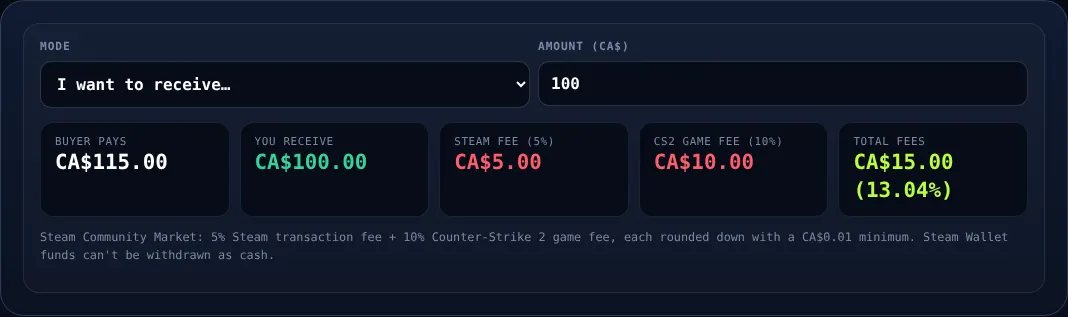
If you sell a skin on the Steam Community Market, proceeds go into your Steam Wallet. That balance can buy games and items but cannot be sent to a bank. It is also the most expensive way to sell, because fees are taken from the sale price. Use our Steam fee calculator to see exactly what you would lose. If your goal is real cash, skip the Steam Market.
Route overview
| Route | Typical cost | Speed | Main risk |
|---|---|---|---|
| Third-party skin marketplace | Seller fee plus payout fee | Hours to days | Platform trustworthiness |
| P2P trade for crypto | Spread plus network fee | Minutes to hours | Scams, price slippage |
| Site coins withdrawn to crypto | Withdrawal fee | Minutes | Volatility |
| Crypto to CAD on exchange | Trading and withdrawal fees | Same day to 2 days | Price swings, KYC |
| Interac e-Transfer out | Often small or free | Minutes to hours | Limits, bank holds |
Route 1: Sell on a third-party marketplace
Many sites let you list a skin and receive balance in crypto or other payout methods. Compare the listed price to the Steam Market equivalent and then subtract the platform's selling fee. Always read the withdrawal minimum, because small payouts can lose a large percentage to fixed fees.
Route 2: Convert through crypto
The most common path is skins to crypto to CAD. Many Canadians use a stablecoin or a major coin, then sell it on a FINTRAC-registered exchange and withdraw to RBC, TD, Scotiabank, BMO or CIBC via bank transfer or Interac e-Transfer. Strengths: low cost on larger amounts, fast. Weaknesses: price movement while funds are in transit, more steps and a taxable event on disposal.
Tip: Stablecoins reduce price swings between the moment you sell the skin and the moment you convert to CA$. Check the exchange's fee schedule first.
Our Interac versus crypto comparison goes deeper on this trade-off.
Route 3: Gambling site withdrawals
If you hold a balance on a gambling platform, you can usually withdraw as skins or crypto. Some sites denominate in coins, and our coins-to-CAD converter helps you estimate the value. Platforms like CSGOEmpire support crypto deposits and a P2P marketplace, which gives you more exit options. Always verify withdrawal rules, minimums and any wagering requirements before depositing; bonuses can lock your balance until requirements are met, so use the wagering calculator.

Worked example: cashing out a CA$500 skin
| Step | Assumption | Result (approx.) |
|---|---|---|
| List price | CA$500 | CA$500 |
| Marketplace fee | Around 5% | CA$475 |
| Crypto conversion and network cost | Around 1% to 2% | CA$465 - 470 |
| Exchange sale to CAD | Around 0.5% to 1.5% | CA$455 - 467 |
| Bank withdrawal | Often free or small | CA$450 - 467 |
These figures are illustrative only; fees vary by platform and change often. The takeaway is that a realistic all-in cost is commonly in the range of several percent, not zero, and the Steam Market route would cost considerably more.
Taxes: what the CRA may care about
Under current guidance, recreational gambling winnings are generally not taxable in Canada. However, selling or exchanging crypto can be a disposition that triggers capital gains, and if you trade skins frequently with a profit motive, the CRA may treat the activity as business income. Keep records: dates, amounts in CA$, wallet addresses and exchange statements. Our CS2 gambling taxes guide goes into detail. This is general information, not tax advice; talk to a qualified professional.
Safety checklist before you cash out
- Test with a small withdrawal first.
- Confirm wallet addresses character by character.
- Never share your API key or Steam Guard codes; see how to avoid scams.
- Expect identity verification on exchanges.
- Keep screenshots of trade offers and transaction IDs.
Common mistakes
- Selling on Steam and then discovering the money is trapped.
- Ignoring minimum withdrawal amounts and fixed fees.
- Letting crypto sit unconverted while the price drops.
- Forgetting to record the CA$ value at the time of each transaction.
- Using a method your bank flags without telling it first.
Legal context
Gambling is regulated provincially under the Criminal Code. Ontario runs a licensed iGaming market through iGaming Ontario and the AGCO, and offshore skin gambling sites are not licensed there. Read our legal overview so you understand the risks of using unlicensed operators.
Frequently asked questions
Can I withdraw Steam Wallet funds to my bank?
No. Steam Wallet funds stay inside Steam and cannot be cashed out to a bank account. To get real money you need to sell on a third-party route.
What is the cheapest way to cash out skins in Canada?
It depends on the item and amount. Peer-to-peer or third-party marketplaces usually cost less than selling on the Steam Market, but you must also account for withdrawal and exchange fees.
Do I pay tax when I cash out skins?
Recreational gambling winnings are generally not taxable in Canada, but selling or converting crypto can trigger capital gains, and frequent trading may be treated as business income. Consult a tax professional.
How long does it take to get CAD in my account?
Interac e-Transfer can be near-instant once a platform releases funds, while crypto and bank transfers can take minutes to days depending on verification and network conditions.
Play responsibly: CS2 gambling is for adults 19+ (18+ in AB, MB, QC). Set limits, never chase losses, and use self-exclusion if it stops being fun. Free, confidential help: ConnexOntario 1-866-531-2600 or your provincial helpline — see our responsible gambling page.
Related reading
Interac vs Crypto for Skin Sites: What Canadians Should Use
Most skin sites do not take Interac directly, so the real choice is between skins, crypto and a few workarounds. Here is how they stack up.
Read article →
CS2 Gloves Buying Guide for Canadians
Everything a Canadian buyer needs to know before purchasing gloves in CS2, from families and wear to fees and safe payment.
Read article →
Gamdom vs Roobet: Which Should Canadians Pick?
Gamdom brings skin deposits and rakeback; Roobet brings a big match and crypto-first originals. We help you choose.
Read article →